




15
+
YEARS OF
EXPERIENCE
1000
+
SUCCESSFUL
Projects
80
+
Satisfied
Clients

In today’s dynamic cybersecurity landscape, implementing robust threat protection is essential for any enterprise. Microsoft Defender emerges as a powerful, integrated security solution designed to protect endpoints and identities against evolving cyber threats. Understanding the best practices around Microsoft Defender is crucial for IT professionals seeking to maximize security while optimizing operational efficiency. This article explores core strategies and practical insights to ensure your institution leverages Microsoft Defender to its full potential.
Maximizing Security with Microsoft Defender Best Practices
Microsoft Defender offers a comprehensive security framework that integrates antivirus, threat detection, automated examination, and response capabilities. To maximize its effectiveness, organizations should begin by ensuring that Defender is fully deployed and updated across all endpoints. Regular updates enhance detection capabilities and protect against the latest threats. Another critical practice includes configuring real-time protection and cloud-delivered protection to enable faster threat intelligence sharing.
Enabling attack surface reduction rules is an effective way to minimize vulnerabilities by restricting risky behaviors such as executable injection or credential theft attempts. Administrators should also leverage Microsoft Defender’s Endpoint Detection and Response (EDR) features, which provide detailed insights and automated remediation actions. Centralized management through Microsoft Endpoint Manager or Defender Security center simplifies policy enforcement and monitoring.
integrating Defender with Microsoft 365 Security enables a unified security posture across devices, identities, and cloud applications. Organizations that adopt these best practices can shift from reactive threat management to a proactive security strategy, reducing risk exposure and increasing operational resilience.







Enhancing Threat Protection and Compliance with Microsoft Defender Best Practices
Implementing Microsoft Defender effectively requires more than simply enabling security features. Organizations must align threat protection with regulatory compliance, establish continuous monitoring, integrate threat intelligence, and ensure proper configuration and training. Below is a practical guide to maximizing security outcomes while maintaining compliance standards.
1. Align Threat Protection with Regulatory Compliance
- Map Microsoft Defender controls to regulatory frameworks such as GDPR, HIPAA, and ISO 27001.
- Leverage detailed reporting and audit-ready logs to demonstrate compliance during audits.
- Customize security baselines to reflect internal governance policies and industry-specific requirements.
- Ensure consistent policy enforcement across endpoints, servers, and cloud workloads.
2. Implement Continuous Monitoring and Advanced Threat Detection
- Enable real-time monitoring powered by behavioral analytics and machine learning.
- Detect anomalies and suspicious activity before threats escalate into breaches.
- Utilize automated investigation and remediation (AIR) to reduce manual response time.
- Establish alert prioritization processes to minimize alert fatigue.
3. Strengthen Response with Automation and Staff Training
- Automate containment and remediation to accelerate incident response.
- Provide ongoing security awareness and technical training for IT teams.
- Develop clear escalation procedures for high-risk incidents.
- Regularly review and fine-tune detection rules to improve accuracy.
4. Integrate Global Threat Intelligence
- Leverage integrated threat intelligence feeds to enrich detection capabilities.
- Correlate internal telemetry with global threat data for improved accuracy.
- Continuously update policies based on emerging threat trends.
5. Address Configuration and Integration Challenges
- Plan initial configuration carefully to avoid misalignment with business needs.
- Ensure seamless integration with existing security tools and infrastructure.
- Conduct periodic security posture assessments to identify gaps.
- Consider partnering with experienced IT service providers to optimize deployment and ongoing management.
By following these best practices, organizations can transform Microsoft Defender from a basic endpoint protection tool into a comprehensive security and compliance platform that supports long-term resilience and regulatory readiness.
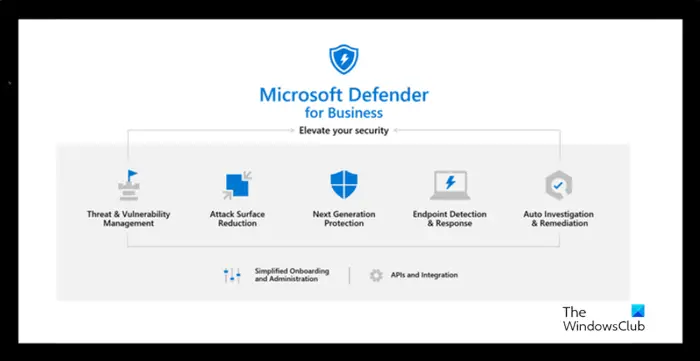
Microsoft Defender’s unified platform streamlines incident management and risk assessment. Ensuring your team is well-prepared to utilize these tools will result in a proactive security stance. Cloud Technologies offers specialized support to integrate these best practices seamlessly into your security operations.
Driving Business Continuity through Microsoft Defender Best Practices: Case Studies and Implementation Insights
Real-world deployment of Microsoft Defender highlights how structured adherence to best practices mitigates risks and strengthens IT resilience. For instance, a multinational financial services firm implemented Microsoft Defender’s EDR and cloud-based protection together with incident automation workflows. This integration led to a 40% reduction in mean time to detect (MTTD) and mean time to respond (MTTR), safeguarding sensitive financial data from emerging ransomware threats.
Another compelling case study involves a healthcare provider that configured attack surface reduction rules and utilized Defender’s vulnerability management tools to proactively address endpoint vulnerabilities before exploitation. The result was enhanced compliance with HIPAA requirements and fewer disruptions to critical patient care systems.
Though, success with Microsoft Defender requires careful planning, continuous tuning of security policies, and collaboration between IT, security teams, and business units. Organizations are encouraged to leverage data-driven insights from Defender to prioritize security investments and align defense mechanisms with evolving threat landscapes. TechCloud IT Services L.L.C’s expertise in Microsoft security ecosystems enables organizations to tailor Defender configurations to their unique infrastructure and risk profiles, fostering a resilient security posture without impeding business agility.

answer time
satisfaction
score
on initial call
same business
day
Empower Your Enterprise Security with Microsoft defender Best Practices
Implementing Microsoft Defender best practices is a strategic imperative for organizations aiming to safeguard their digital assets against complex cyber threats. From deploying advanced endpoint detection features to integrating compliance management and leveraging automated remediation, each layer of Defender’s capabilities strengthens your security fabric. Ensuring ongoing optimization through monitoring and expert support positions your business to respond swiftly and decisively to incidents, minimizing operational impacts.
For businesses seeking to enhance their cybersecurity framework, partnering with a trusted IT service provider like TechCloud IT Services L.L.C trading as Cloud Technologies can make the difference. Our team specializes in delivering customized Microsoft Defender solutions that align with your organization’s goals and compliance requirements. Connect with us today to explore how we can help you implement these best practices efficiently and effectively, securing your infrastructure for the future.